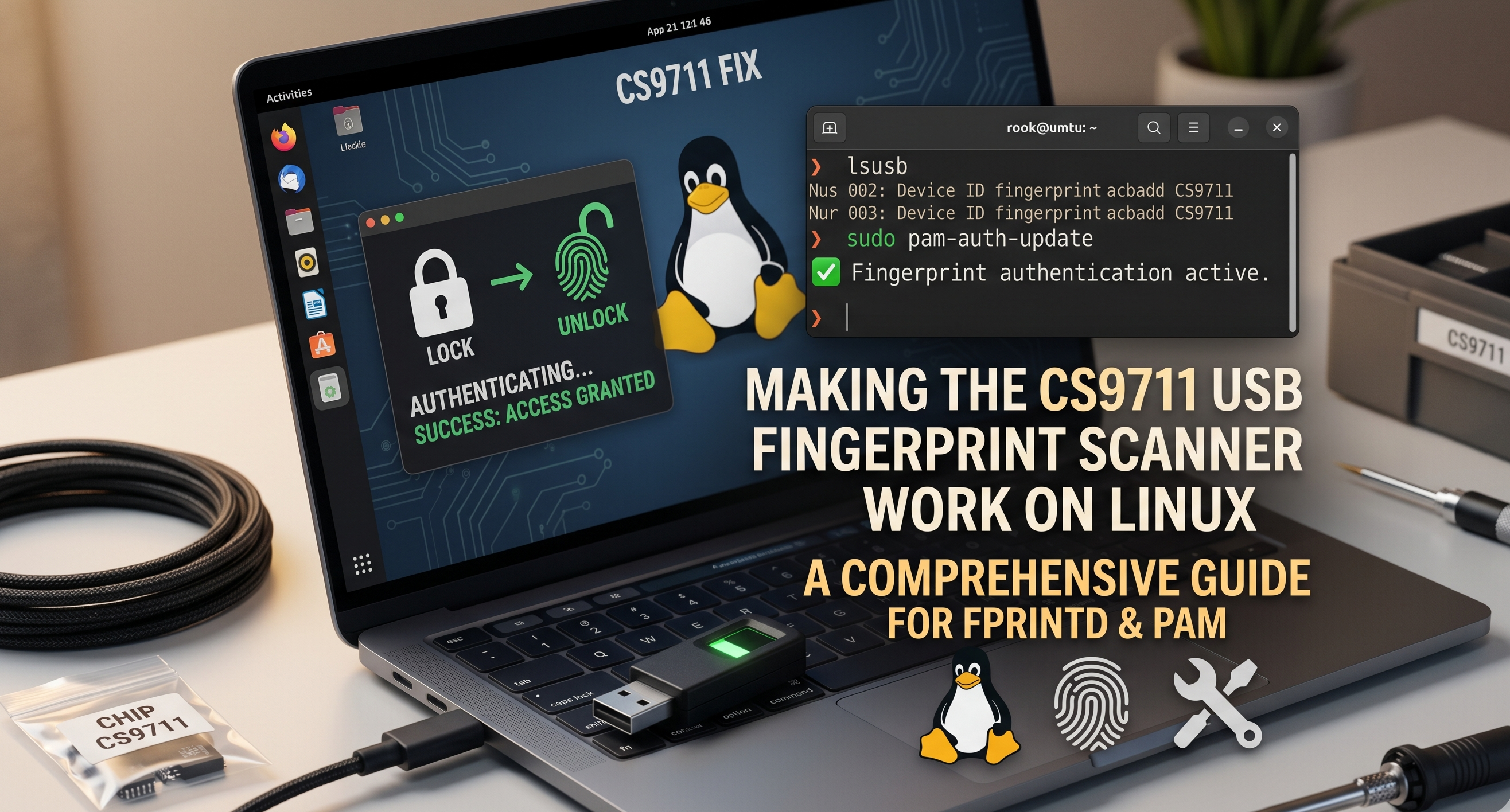
Making a Cheap USB Fingerprint Scanner Work on Linux — The CS9711 Story
I bought a $10 USB fingerprint scanner for my Linux desktop and discovered it was not supported. So I built an open-source installer with a GTK4 GUI that makes it work across Ubuntu, Fedora, Arch, and more.
The Problem
I use Linux as my daily driver — Ubuntu on my workstation at home. When I picked up a cheap Chipsailing CS9711 USB fingerprint scanner (the kind you find for $10-15 online), I expected it to just work. Plug it in, enroll a finger, done.
It did not. The stock libfprint library that Linux uses for fingerprint authentication has no support for the CS9711 chip. The scanner lights up when you plug it in, but the system does not know what to do with it.
There is a community fork of libfprint by archeYR that adds CS9711 support, but getting it working means cloning repos, installing build dependencies, patching source code, compiling from source, and configuring PAM — all manually. Miss one step and it fails silently.
I figured if I had to go through all of that, I might as well automate it so nobody else has to.
What I Built
The project is a one-command installer that handles the entire setup. You clone the repo, run install.sh, and your fingerprint works for login, lock screen, and sudo.
git clone https://github.com/mmhfarooque/chipsailing-cs9711-fingerprint-linux.git
cd chipsailing-cs9711-fingerprint-linux
./install.sh
The installer auto-detects whether you are on Ubuntu, Debian, Fedora, Arch, or openSUSE, and uses the right package manager. It clones the community driver, applies a retry delay patch (the default 250ms is way too fast — your finger gets rejected before you can reposition it), builds the patched library, and sets up PAM with sensible defaults.
The GUI Manager
The command line is fine for the initial install, but managing fingerprints afterwards — enrolling new fingers, adjusting scan timing, checking what is set up — that should be visual. So I built a GTK4/libadwaita GUI manager in Python.
It shows you everything at a glance: is the scanner connected, is the driver installed, which fingers are enrolled. You can enroll new fingerprints with a 15-touch progress bar, adjust the retry delay with a slider, configure how many attempts you get before it falls back to password, and see which auth locations (login, sudo, lock screen) are using fingerprint.
There is also a maintenance section — rebuild the driver after system updates, check for updates from GitHub and apply them with one click, or uninstall everything cleanly. The GUI even has its own activity log viewer for troubleshooting.
Bugs That Taught Me Something
The project went through more than 20 releases (v1.0.0 to v2.0.0), and a lot of the interesting work was fixing subtle bugs that only show up when a GUI runs system commands as root, or when somebody installs your software on a desktop environment you have not tested on.
A few that stand out:
Shell injection risk — Early versions wrote user variables directly into temporary shell scripts that ran via pkexec (the Linux equivalent of Run as Administrator). A carefully crafted username could have run arbitrary commands as root. Fixed it with shlex.quote() and tempfile.mkstemp().
The double password prompt — On first enrollment, the GUI asked for your password twice: once to delete existing fingerprints (there were none) and once to enroll. The fix was simple — check if the finger exists before trying to delete it. But it is the kind of thing you only notice when you watch someone use your software for the first time.
Kill the wrong process — After installing the driver from a terminal, the script ran kill $PPID to close the terminal window. Except when launched from the GUI, $PPID was not a terminal — it was the GUI process itself. Killed the app. The fix: check that the parent process is actually a shell before sending the signal.
Silent PAM skip on a fresh Ubuntu — The Debian/Ubuntu install path edited an existing pam_fprintd.so line in /etc/pam.d/common-auth. Except on a fresh install, that line does not exist yet — the libpam-fprintd profile ships disabled by default. The script silently skipped PAM and you got a working fprintd-verify while sudo, lock screen, and SDDM never even tried fingerprint. v1.8.2 switched to editing /usr/share/pam-configs/fprintd and running pam-auth-update --enable fprintd — the canonical Debian path that survives package upgrades.
The icon that was native — except where users were. v1.4.0 swapped the generic gear for a "native fingerprint icon" using auth-fingerprint-symbolic. It looked great on GNOME. Then somebody installed it on KDE Plasma and the launcher showed a blank-page glyph. Cinnamon (Mint), MATE, XFCE — same. That icon name only ships in the Adwaita icon set; on every other theme the freedesktop icon-fallback chain finds nothing under auth- and gives up. The fix in v1.8.3 is a bundled SVG referenced by absolute path — theme-independent on every freedesktop-compliant DE. The lesson: when your .desktop file assumes every user has your icon theme, half your users get the blank glyph.
The PAM panel that lied — The GUI's "where is fingerprint enabled" panel did substring matching on PAM files. Sounds reasonable until you realise that on Debian/Ubuntu, /etc/pam.d/sudo just says @include common-auth — the actual pam_fprintd.so line lives only in common-auth. Worse, on Kubuntu, /etc/pam.d/polkit-1 and /etc/pam.d/kscreenlocker are not even shipped — those services fall back to PAM defaults. The panel cheerfully reported "Not configured" while fingerprint actually worked. v1.8.3 follows @include chains recursively (and include / substack for Fedora and Arch) and falls back to checking the distro's common stack when no service-specific file exists.
v2.0.0: Surviving the Real World
The jump to v2.0.0 was about getting the installer off "works on my machine" and onto every mainstream distro — and surviving what users actually do to it.
The system update that broke fingerprint. The single most common complaint was "a system update overwrote libfprint and broke my fingerprint." v2.0.0 ships a self-healing update guard: a package-manager post-transaction hook (apt DPkg::Post-Invoke, dnf5 libdnf5-plugin-actions, dnf4 post-transaction-actions, pacman PostTransaction) that detects when the freshly installed libfprint has lost the cs9711 driver and restores it automatically from a root-owned cache at /var/lib/cs9711-fingerprint. The restore is a plain file copy — fast, and it can't fail to compile.
No building as root. An earlier guard rebuilt the driver as root from the user's home directory — a local privilege-escalation footgun. The root-owned-cache restore replaces it: nothing in a user-writable directory ever runs as root.
Won't silently break a different reader. The installer builds a CS9711-only libfprint into /usr/local that shadows the system one. On a laptop with a different fingerprint reader (Goodix, Synaptics, ELAN) that would quietly break it. So v2.0.0 aborts if the CS9711 (2541:0236) isn't detected, unless you override with CS9711_FORCE=1.
OpenCV 5, ahead of time — or so I thought. The sigfm matcher's OpenCV dependency was changed to prefer opencv4 and fall back to opencv5, so it would keep building as distros moved on. When OpenCV 5 actually shipped, that turned out to be the wrong half of the problem — see the next section.
When OpenCV 5 Actually Landed
Two paragraphs up I wrote that the OpenCV fallback would keep things building as distros moved on, and that no shipping distro had OpenCV 5 yet. Both halves of that aged badly, and the way they failed is the most useful thing in this whole project.
In July a CachyOS user, Josep Carles, opened an issue: after a system update to opencv 5.0.0-1, his scanner had stopped working. Not failing to build — it was already installed. lsusb still listed the device. The GUI reported no scanner at all. He rolled back with a btrfs snapshot, pinned OpenCV 4.13, and got on with his life, which is a very reasonable response to somebody else's broken software.
Here is what was actually happening. The patched libfprint links against specific OpenCV shared-library versions — libopencv_core.so.413 and friends. When the distro moved to OpenCV 5, those files were deleted. The library was still sitting on disk with the CS9711 driver compiled into it, but the dynamic linker could no longer load it, so fprintd reported no devices. Meanwhile the USB device was fine, which is why it presented as a hardware problem and not a library problem.
My update guard made it worse in a quiet way. It checked whether the active libfprint still contained the cs9711 marker, and if not, restored a cached copy. But the cached copy had been built against exactly the same OpenCV libraries that had just been removed. It restored a file that could not load, reported success, and moved on. A rebuild would not have saved him either — the build itself still hard-required opencv4 in one place.
Three things came out of the fix, in v2.1.0:
The dependency lookup now walks a chain. OpenCV is resolved as opencv4, then opencv5, then plain opencv through pkg-config, and finally through CMake's own OpenCV config — which Arch-family systems ship even when no pkg-config file exists. The same patch is now applied in the installer, the rebuild path, the container builds, the PKGBUILD, the RPM spec and the deb build. The packaged builds had all still been hard-requiring opencv4; only the installer had the fallback. That is the sort of gap you get when you patch the path you personally use.
The guard checks whether the driver can load, not whether it exists. After every package transaction it runs the equivalent of ldd on the active library. If dependencies have vanished it refuses to restore a cached copy that has the same problem, logs exactly which libraries are missing, and flags the state. The pacman and dnf hooks now also fire on OpenCV transactions, not just libfprint ones.
The GUI names the problem. Instead of a generic not-installed message, it now says the driver is broken, lists the missing libraries, and offers the rebuild button. Somebody in this state should not have to guess at a USB cable.
The lesson I keep turning over: my fallback was written for the build, and I assumed that covered the installed case. It did not. A dependency that disappears from under working software is a different failure from a dependency that is missing when you compile, and defending against one taught me nothing about the other.
The Button That Did Nothing on Arch
The second issue came from a CachyOS user going by popy2k14, and it was much simpler — which somehow made it worse.
There is no /etc/pam.d/common-auth on Arch. That file is a Debian convention. My GUI had a button labelled Apply PAM Settings, and on Arch it did precisely nothing: no error, no warning, just a success message and an unchanged system. He worked it out himself, added the line to /etc/pam.d/system-auth by hand, and then — generously — filed an issue so the next person would not have to.
The irritating part is that the underlying model had already been fixed. Since v2.0.2 this project stopped touching the shared auth stack entirely and writes fingerprint into each service's own PAM file, so login, lock screen, sudo and polkit can be switched independently. The Apply button had simply been left behind on the old global model, still looking for a file that Arch does not have.
It now re-stamps the attempt and timeout settings onto every location that is currently switched on, using the same per-service files the toggles manage, in a single authentication prompt. If nothing is switched on it says so rather than claiming success. Silent no-ops are the worst class of bug in a configuration tool: the user has no way to tell the difference between working and being ignored.
Rebuilding the Interface
The GUI had grown to seven stacked sections in a single column about 1900 pixels tall. On most screens that put maintenance and diagnostics below the fold, and the only way to see the whole app was to scroll it like a web page. It worked; it just did not respect the reader.
v2.2.0 lays it out as two columns instead. The left side follows the job you came to do — does this work, enrol a finger, tune how hard it tries. The right side holds configuration and upkeep: where fingerprint applies, maintenance, diagnostics. Everything fits on one screen.
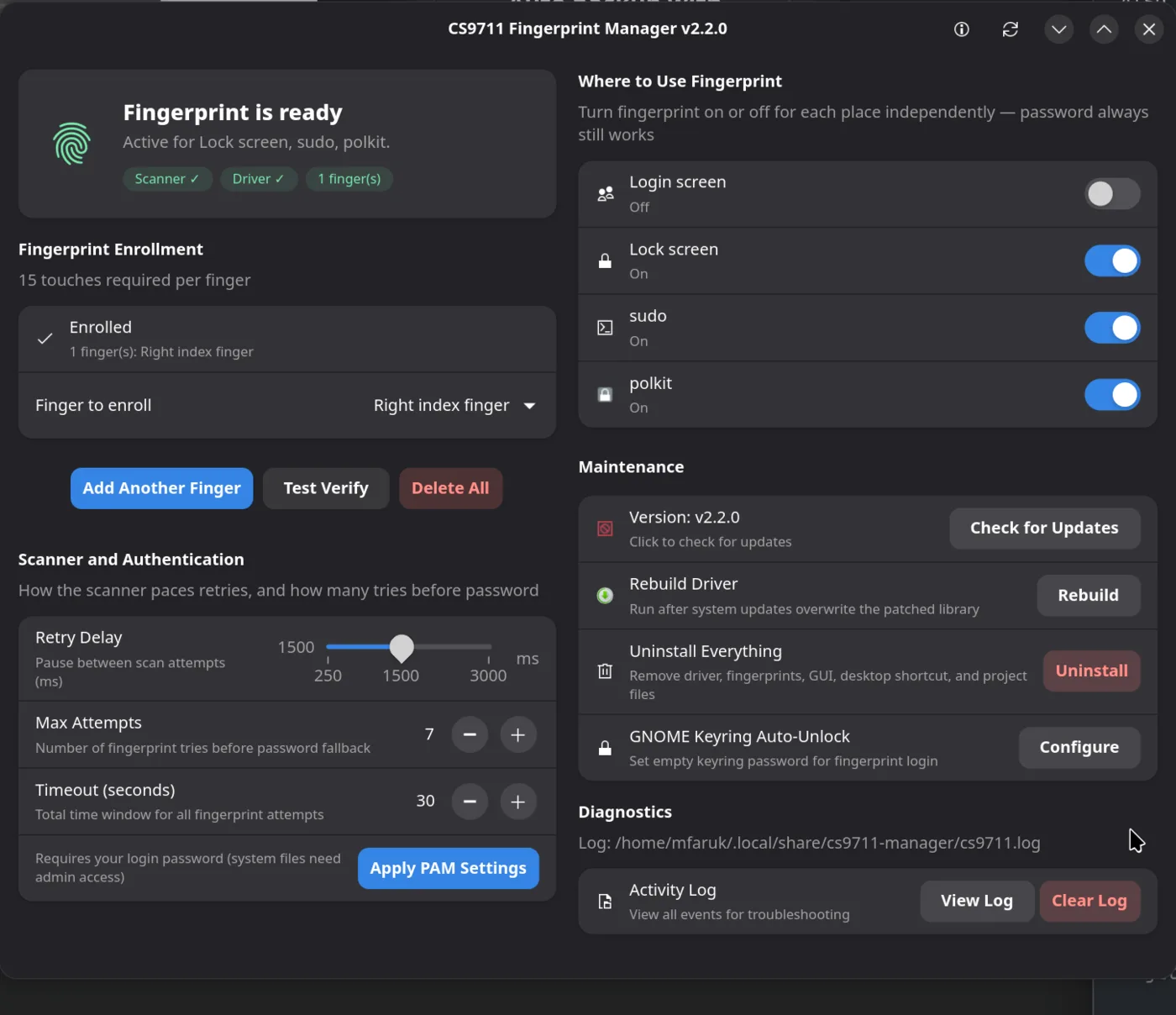
The interesting constraint was that it still has to work narrow. A GTK4 window has to be usable at small widths, and I did not want to trade a dashboard for that. libadwaita has a breakpoint mechanism for exactly this: above a width threshold the two columns sit side by side, below it they fold back into one vertical column. So a wide desktop window on KDE, GNOME or Cinnamon gets the dashboard, and a half-tiled or narrow window gets the old single column, from the same code.
Two portability bugs surfaced while testing, both because my machine now runs KDE Plasma rather than GNOME.
The first was the icon bug from this article's own history, repeated by me. I used auth-fingerprint-symbolic for the new status card. That is an Adwaita name; Breeze does not ship it, so it rendered as a broken-image glyph — the exact failure I wrote about above, in the exact same project, years of releases later. Icon names now get checked against the running theme with a fallback chain. Writing about a mistake evidently does not inoculate you against it.
The second was subtler: libadwaita parses group headings as markup, so a bare ampersand in a heading raised a markup error and silently blanked that heading. Two characters, one invisible failure.
The Bug in My Own Fix
There is a coda to the OpenCV story that I think is the most honest thing in this article.
After I shipped the linker-path fix, Josep Carles retested on CachyOS and reported back: it worked. But his first run had failed, aborting with a message that the system still resolved the stock /usr/lib/libfprint-2.so.2. He only got through by running sudo ldconfig himself and trying again.
That was my bug, and it is a small, sharp one. ldconfig -p reads the linker cache and works fine as a normal user. Plain ldconfig rebuilds the cache and needs root. My helper called the rebuild without sudo and redirected the resulting permission error to /dev/null — so it wrote the configuration file correctly, silently failed to rebuild the cache, then read the stale cache, concluded its own fix had not worked, and aborted. The fix had been in place the whole time. Only the verification was wrong.
The lesson generalises further than this project: never swallow the error from a privileged operation and then trust a read that depends on it having succeeded. The failure will not look like a permissions problem. It will look like the thing you just fixed is still broken.
Current State
The project is at v2.2.4, MIT licensed for the installer and manager, LGPL-2.1-or-later for the driver it builds. It supports Ubuntu, Debian, Fedora, Arch, openSUSE, Linux Mint and their derivatives. Releases now carry both a .deb and an .rpm — the deb had quietly stopped shipping when I moved off Ubuntu, because its build script required Debian's own packaging tool; it now assembles the archive directly, so it can be built anywhere. Note that both packages contain the driver only: the GUI, the update guard and the PAM management come from the repository route, ./install.sh.
My reference platform on real hardware is openSUSE Tumbleweed with KDE Plasma 6, where enrol, match and sudo/lock/polkit all work.
Both issues are fixed, and — the part that matters — confirmed working on real CachyOS hardware with OpenCV 5 by the person who reported it. That confirmation was the whole point of leaving the issue open, because I own no Arch-family machine and could only ever reproduce the failure in simulation.
One thing worth being precise about: this project is the installer and setup layer. The actual driver and its fingerprint matching live upstream in archeYR/libfprint-CS9711 — the installer ships and configures that fork and prompts you to re-enrol for a clean template, rather than claiming to improve matching quality itself.
If you have a CS9711 scanner (USB ID 2541:0236) and run Linux, give it a try: